


-
Contents
- Routing restrictions
- Settings
- Slots and counters
- Route restriction program
- Route restriction actions
- Route restriction conditions
- Restriction criteria
- Copying & sharing rules
Restricted pathfinding, or routing restrictions, is a feature that had been implemented by JGR back in TTDPatch and later been ported to OpenTTD. It is a very powerful and equally complex feature that can be used to have fine-grained control over the paths that trains may take. It influences the pathfinder by placing restrictions on signals. The pathfinder will then ignore the tracks beyond the signal if the train does not match the restriction criteria. The behavior of the signal itself is not changed in any way. A routing restriction can be placed on any signal, it works independently from the normal signal behavior.

Routing restrictions
The pathfinder is activated by trains when looking for the best path to their next destination based on the current order. In simple terms, the pathfinder starts at the current position of the train and then looks along the railway network to find possible ways that lead to the destination. Each switch, each junction and every kind of diverging track is being checked, as in most cases there will be multiple ways to reach the destination, which in turn may be equally possible (in most cases there is no relevant difference between the left platform or the right platform on a station). From all these possible routes to the destination, the best one is chosen, where the length of the route, the number of signals showing "Stop!" right now and a couple of other factors come into play. Based on all these criteria, a sum is calculated that describes the quality of the route. The sum is to be interpreted as a sum of penalties, so the smaller the sum, the better the route.
The routing restrictions influence exactly this pathfinder algorithm. On each signal that is encountered, it is checked whether there is a restriction there. If it is, and the train does not fit to the criteria, it basically tells the pathfinder that this signal is a dead end and the track beyond the signal cannot be relevant for planning a route to the destination. By using such restrictions one can control which tracks a train may use, depending on properties of the train itself.

One cannot only restrict the pathfinding, but also execute other actions. One can change the way the path reservation works (and e.g. reserve longer paths across multiple signal blocks), enforce speed limits or control the number of trains in a specific part of a line to avoid trains blocking each other.
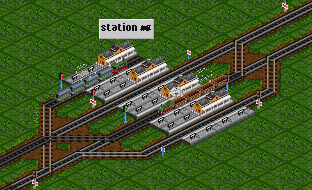
This station contains multiple signals with routing restrictions. When using the normal light signals and not using a custom signal set, a blue signal post marks signals on which there is some kind of routing restriction.
The station has a terminal platform on the left. Only trains that are coming from the left and are to leave to the left should go there. The track next to it is to be used only by trains coming from the right, stopping at the station and continuing on to the left. The third track (the one with the freight train) is for trains that pass the station without stopping. The rightmost track is for trains coming from the left, stopping at the station and continuing to the right.
The following things have been achieved by routing restrictions here:
- Trains that do not stop, shall use the middle track as demonstrated by the freight train.
- Trains that pass the station without stop shall have priority over trains that stop at the station. That improves overtaking for non-stopping trains.
- Trains that come from the left and go back to the left, shall only use the terminal track to the left.
- Trains are routed to the correct platforms depending on their schedule, no waypoints are used.
This example shall only serve to demonstrate how powerful this feature is - all the aforementioned requirements can be implemented without waypoints. New trains with different schedules coming along this station will automatically behave according to these rules, one does not have to adapt orders or anything.
Settings
Some game settings influence this feature, mainly by controlling whether one gets to see the full complexity of it.
- Show advanced features of routing restrictions
When activating this option one can use slots and counters and utilize the possibilities that come with them. There are also some additional actions available in the scope of routing restrictions.
- Realistic braking of trains
The standard braking mode in the game allows trains to stop in an instant, like when a signal switches to red directly before a train passes it. This avoids collisions, but it is unrealistic. Trains need several 100 yards or even up to several miles to stop, depending on their weight and speed. With this option enabled, not only the braking distance changes: In order to give the trains a safe track for braking, path reservation is influenced as well. Trains will reserve enough track even across multiple signals in order to have as much braking distance as needed for their speed. This also means the whole feature works exclusively with path signals. Presignals, programmable presignals and block signals cannot be used and will not be shown in the signal menu. Two-way block signals cannot be used either. One-way block signals are upgraded to path signals when enabling this option.
As trains have longer braking distance and will reserve that path accordingly, the player cannot interfere on such a reserved track anymore if it would affect the reserved path. Demolishing tracks is not possible, as is adding or removing signals. One has to wait for the train to clear the track in order to do track modifications.
When this option is enabled, additional signal aspects can be shown, not just "Stop!" and "Go!". A signal set supporting the feature needs to be used to see this in action.
- Realistic braking depends on signal aspects
Normally, trains can look ahead infinitely to check when they will have to brake. With this option, this distance is reduced to what the current signal aspect shows. This may lead to trains running slower than what they theoretically could run, as they cannot "see" far enough ahead to know that the braking distance for higher speeds is fully clear. This only works with a signal set supporting the additional signal aspects. As can be guessed, this is a feature for very experienced players.
Slots and counters
Slots are a real-world system to manage train movements especially on single-tracked lines. It was developed in the 19th century and is still in use today in some places. The idea is simple: In order for a train to enter a single-tracked part of a line, it needs to own an object, a so-called token. The kind of token (a ring, a stick, a key, ...) does not matter, but it is paramount that exactly one such token exists. If there is only one such token, and only the train owning that token can run on the line, there cannot be any collisions. That is the whole theory of the system, there also is an article in Wikipedia explaining it in more detail.
The concept can be generalized: A slot limits the number of users that can access a resource. Think of a popular museum: In order to provide good experience for all visitors, only 300 visitors are allowed simultaneously. This is also realized with a slot-system, with the difference that there are 300 tokens instead of a single one. At the entrance it is checked if the visitor has one of the 300 tokens, at the exit the visitor returns the token. Once all 300 tokens are in use, the next visitor will have to wait at the entrance for another visitor to leave and return a token. Of course this would be implemented using a counter system at entry and exit to not have issues with embarrassed visitors who have lost their token somewhere in the museum...
Computer scientists know about that concept as semaphores (guess where that name comes from..). In that field, operating systems for example regulate concurrent access to data structures, files and such.
The system of slots and counters in JGR's patch pack works in the same way. A slot can be created and given a maximum capacity. This tells the system how many trains can be active in that slot at the same time. Then a fitting programming for signals is needed to check the entry and exit of the line that is to be capacity-restricted. At the entry it needs to be checked that the entering train has a token of that slot. If it does not, it has to wait for a token to be freed. At the exit of the section, a train has to return the token, so that the next train can use it.
Slots and counters are managed via the list view of the train menu. In the drop-down one can choose the corresponding entry in the "manage lists" option. There you can then create new slots and counters or adapt existing ones.
Slots and counters, after they have been created, can be used in routing restrictions, but also for programmed presignals and conditional jump orders in the train schedule.
Examples can be found on the pages for networks and stations in more detail.
Route restriction program
Programming routing restrictions is one with a special GUI that can be called from the signal building menu. First you choose the wrench symbol to the right, then you click the signal that you want to work on. This opens up the window for programming. It shows the program connected to the signal (if any) and contains buttons to manipulate the program. By choosing the different orders with the mouse, the corresponding buttons will be activated, allowing the adapt everything in whichever way it is desired. Honestly, it sounds a lot more complicated here than it really is.
A program is executed from the top to the bottom and consists of a series of statements. An statement can be a direct action or a conditional statement.
action
An action results in a change to the pathfinder, the path reservation or other elements of the game. It can happen directly (without any conditions), in such cases it will always be executed. It can also be part of a conditional statement block, meaning it is only executed if the conditions are fulfilled. Example:
restrict speed to 30 mphconditional statements
A conditional statement is a statement where the execution depends on one or more conditions that need to be fulfilled:
IF (condition)
THEN (statement)IF train can transport coal
THEN restrict speed to 30 mphThere are multiple forms of conditionals statements which have to be built together from several pieces:
IF
IF (condition)
  THEN (statement)
ELSE IF
This block can only be placed after a IF/ELSE IF/OR IF-Block.
ELSE IF (condition)
  THEN (statement)
OR IF
This block can only be placed after a IF/ELSE IF/OR IF-Block.
OR IF (condition)
  THEN (statement)
ELSE
This block can only be placed after a IF/ELSE IF/OR IF-Block.
ELSE (statement)Using these pieces one can now build more complex conditional statements. A couple of examples shall demonstrate it:
-
IF (condition)
  THEN (statement1)
ELSE (statement2)
So whenever the condition is fulfilled, statement1 is executed, in any other case, statement 2 is executed.
-
IF (condition1)
OR IF (condition2)
  THEN (statement1)
Whenever condition1 is fulfilled or condition2 is fulfilled or both of them are fulfilled, then statement1 is executed. This is a logical OR of condition1 and condition2.
-
IF (condition1)
  THEN (statement1)
ELSE IF (condition2)
  THEN (statement2)
Whenever condition1 is fulfilled, then statement1 is executed. In all other cases, condition2 is checked, and if it is fulfilled, statement2 is executed.
-
IF (condition1)
  THEN (statement1)
ELSE IF (condition2)
  THEN (statement2)
ELSE (statement3)
Whenever condition1 is fulfilled, statement1 is executed. In all other cases, condition2 is checked, and if it is fulfilled, statement2 is executed. If neither condition1 nor condition2 are fulfilled, statement3 is executed.
-
IF (condition1)
  THEN IF (condition2)
    THEN (statement1)
If condition1 is fulfilled, then condition2 is checked, and if it is fulfilled as well, statement1 is executed. That means statement1 is only executed if both condition1 and condition2 are fulfilled (logical AND).
This nesting can be repeated in more depth as needed.
Route restriction actions
The following actions are available:
- Deny
The pathfinder will think of this signal as a dead end and not look for a way to the destination beyond it. It effectively forbids a train from going this way.
- Penalty
The pathfinder will add a penalty to all routes that lead along this signal. This is meant for finetuning pathfinding, as the total sum of penalties on a route dictates whether a route is considered a good or bad choice.
- Reserve through
Normally a path is reserved through one signal block up until the next signal. Once the train reaches that next signal, the next reservation for the next block is done. With this action, the path reservation for the next block is done immediately. If no way can be reserved through the next block, the whole reservation, including the part to this signal, is discarded. With this approach one can, for example, enforce a longer pre-reserved path for fast trains, so that they are not blocked by slower trains. Overtaking at special passing places can be simplified using this action. This action has no effect for signals on bridges or in tunnels.
- Long reserve
When a train reserves a path leading to this signal, a second reservation for the next block, starting at this signal, is triggered. If this second reservation is not possible, the first reservation is still done. This is the main difference to "reserve through", where either the whole path is reserved or no path at all. This action has no effect for signals on bridges or in tunnels.
- News control
This action can be used to disable news reports showing that trains got stuck at a signal. Maybe it is completely ok for trains to wait for a longer time there, as it has to wait for a longer time in a siding or shunting yard because another train is waiting for a full load at the destination station.
- Wait at PBS signal (advanced action)
This option can trigger several actions concerning waiting for reservations:
- Wait at path signal: The trains will wait at the path signal, even if it could reserve a path.
- Cancel wait at PBS signal: This cancels a previously defined "wait at path signal" action.
- Wait at start PBS...: Whenever a train wants to reserve a path that ends at this signal, it shall wait at the other signal and not reserve a path.
- Cancel wait at start PBS...: This cancels a previously defined "wait at start PBS..:" action.
When using this restriction on a block signal, it will not work as expected. The train will move to the signal, stop there, but continue onward immediately. - Slot operation (advanced action)
Several actions related to slots can be executed:
- acquire or wait: When a train wants to pass this signal, it needs to own a token of the slot. It therefore tries to retrieve a token of that slot. If that is not possible, as all tokens are in use, the train will wait at the signal, until a token becomes available.
- try to acquire: When a train wants to pass this signal, it should own a token of that slot. It therefore tries to retrieve a token of that slot. If that is not possible as all tokens are in use, the train will continue regardless.
- release (front): The train returns the token of the slot, when the front of the train passes the signal. This does not influence trains not owning a token of the slot.
- release (back): The train returns the token of the slot, when the back of the train passes the signal. This does not influence trains not owning a token of that slot.
- PBS end: Acquire or wait: This is the same as "acquire or wait", but it is executed when a train tries to reserve a path that ends at this signal. If the slot is full, the train waits at the other signal.
- PBS end: try to acquire: The same as "try to acquire", but but it is executed when a train tries to reserve a path that ends at this signal. If the slot is full, the train still reserves a path and continues to this signal.
- PBS end: release: When a path reservation is done which ends at this signal, the train releases its token of the slot.
- Try to acquire (on reserve): This is similar to "try to acquire", but the retrieval of the token is tried when the train reserves the path, not when it passes the signal. This may make a difference when realistic braking is activated or long reserve is used.
- Reverse (advanced action)
This can trigger various actions related to reversing trains:
- Reverse behind signal: The train shall reverse once it has passed the signal. This only works for path signals that can be passed from the backside.
- Cancel reverse behind the signal: This cancels a previously encountered "reverse behind signal" action.
- speed restriction (advanced action) Restrict the speed of the train to the given value. This restriction stays active until it is canceled at another signal! A value of 0 means canceling the restriction. This can be used to prevent faster trains queuing up after slower ones and then having to brake repeatedly and accelerating again. Or one could restrict the speed when entering a terminal station, just as in real life.
- Counter operation (advanced action)
The following actions are possible:
- Increase: Increase the counter value by 1 when the train passes the signal.
- Decrease: Decrease the counter value by 1 when the train passes the signal. The value will never be decreased beyond zero.
- Set: Set the counter to the given value when the train passes the signal.
- Penalty config (advanced action)
The following actions are possible:
- No PBS back penalty: Normally, every path signal passed from the back will add a small penalty for the route. This action prevents that penalty.
- Cancel no PBS back penalty: This cancels a previously defined action "No PBS back penalty".
- Speed adaptation control (advanced action)
If the automated adaptive train speed control is activated in the game settings, faster trains will slow down to match the speed of a slower train running in front in order to not grind to a halt and start again all the time. This behavior can be controlled in more detail using this action.
The following actions are possible:
- Make exempt: This train will not adapt its speed even if there is a slower train in front.
- Remove exemption: Removes a previously defined "make exempt" action.
- Signal mode control (advanced action, requires combined path/shunt signal)
This option is only available when using a fitting signal set containing combined path/shunt signals (see here). The action allows to define whether the signal should use the path aspect lights or the shunt aspect.
Restriction criteria
There are a variety of criteria that can be used to restrict routing (or to trigger other actions as listed above). These criteria are listed here. An empty or not fully defined criteria is treated as fulfilled.
- train length
The first option is to check the length of the train. This information is shown directly in the information window of the train, right next to the usual values of power, weight and reliability.
Using this condition, one can build stations with different platform lengths and ensure that trains do not go to platforms that are too short.
- max speed in (km/h|mph)
This is simple, one can differentiate fast and slow trains, for example to define dedicated high speed tracks. The restriction for such a signal could then read something like "max speed is greater than 130 km/h".
- current order
This can be used to only let trains go into a station that want to stop there. The value of the order is determined by clicking on the destination station. This results in a restriction roughly like "current order is Smalltown Station". Only "is" and "is not" are provided as options, anything else would not make sense anyway.
- next order
This works like the previous criterion, but works on the order after the current one. This is useful for stations with terminal and through platforms, where the trains need to go to the correct platforms, depending on where they will go after the stop at the station.
- last visited station
It could be necessary to sort trains depending on where they come from. This can be done using this criterion. The last visited station is the one of the last stop, not the last one that may have been passed without stopping.
- freight
There are new graphics sets for freight stations, and it makes sense to have trains go to the "correct" platforms. A train with tank cars looks wrong at a platform for loading wood. In order to restrict which platforms can be accessed, the freight of the train can be checked. Trains that can (or cannot) carry a specific freight are then prevented from going beyond a signal and are hence blocked from accessing a platform. A train is considered to be able to carry a freight if it can load at least one unit of that freight.
- load percentage
This criterion checks how full a train is. A fully loaded train may be prevented from using a steep mountain line, or empty trains could be forced to go to a depot.
- entry direction
This allows to set restrictions based on the current direction of the train with respect to the signal. For example, a restriction may not be relevant if the train passes the signal from the back side.
sky directions? - train group
Trains can be combined in groups. This criterion checks if a train is part of a group. This also works for nested groups. One can for example define that only trains contained in the group "high speed train" may use a specific part of the network.
- train owner
This criterion checks the owning company of a train. This is only useful when more than one company are active on the map. This allows to forbid competitors to overload an already fully loaded section of the network with additional trains.
- train status
This criterion allows checking the train status and considers the following situations:
- train is empty:
?
- train is full:
?
- train is broken down:
?
- train needs repair:
?
- train reverses:
?
- train is heading to station/waypoint:
?
- train is heading to depot:
?
- train is loading:
?
- train is waiting:
?
- train is lost:
?
- train requires service:
?
- train is stopping at station/waypoint:
?
- train is empty:
- weight
This criterion can be used to distinguish behavior based on train weight. One could for example introduce a speed limit for an old bridge, if a train is too heavy. Or one prevents heavy trains from using a steep mountain route and lets them go around the mountain instead.
- power
The train power can also be used as criterion. Maybe only trains with a lot of power are allowed to go on a high-speed track. Maybe one will have to combine this criterion with other criteria, as power is not the only thing that matters.
- max. TE
Similarly to power, one can check the maximum tractive effort of the train. This could be used to prevent weak trains from using a mountainous track. Still, one might want to combine this with other criteria such as power or weight to create a useful condition.
- power ( weight ratio
Power is not everything, but for fast trains it is the most important thing. If a train is too heavy for the available power, it will not reach full speed and may block other, less heavy trains. So there might be useful situations for this criterion.
- max TE / weight ratio
Heavy freight trains need really high tractive effort to get going. Power and top speed are not as important. So this criterion can be used to prevent trains from running on difficult sections of the network.
- engine class
This allows using the type of engine (steam, diesel, electric) as criterion. One could imagine preventing trains using a diesel engine from running on a line with overhead catenary, as it can use an older track without catenary instead (which trains with electric engines cannot use). Or there is specific infrastructure for steam trains (eye candy objects), which of course should then be used by steam trains.
- direction of order target
This criterion checks the sky direction of the current or next order. Depending on sky direction one could enforce trains heading South to use specific tracks when leaving a station so that they do not have to cross the tracks leading West or North.
- train in slot (advanced criterion)
This allows to check whether a train owns a token of the given slot. The concept of slots is explained here.
- slot occupancy (advanced criterion)
One can check how many tokens of a slot are in use and then base restrictions on the result. This allows to e.g. reroute trains or to enforce a speed limit, so that other trains get more time to exit the slot section and release their tokens. The concept of slots is explained here.
- slot occupancy remaining (advanced criterion)
This value is the total number of tokens for the given slot minus the current occupancy (tokens in use). This allows checking if there is room for another train in the section guarded by the slot. The concept of slots is explained here.
- counter value (advanced criterion)
Counters work similarly to slots, depending on counter value different actions can be triggered. I have a hard time finding an actual use case for counters, apart from misusing rails a logic gates. That however is a really specific niche and has nothing to do with realistic railway operations as described on these pages.
- current time/date (advanced criterion)
This is related to the in-game time/date! One can simulate the concept of an integrated clock-face schedule. That means that depending on the time/date, tracks may be used for trains heading into a station, and at other times/dates for trains heading away from the station, allowing to increase the number of trains that can enter or exit the station simultaneously.
- reserved tiles ahead (advanced criterion)
This criterion only works with realistic braking enabled. The value describes the number of tiles in front of the train that are needed as braking distance. So if a train has reserved a long way ahead because it needs so much braking distance, it can be treated differently from a slow train requiring way less braking distance.
- PBS reservation passes tile (advanced criterion)
This allows to check whether a path reservation passes a specific tile of the map. One could for example trigger an additional path reservation if the current one is not yet deemed enough.
- PBS entry signal (advanced criterion)
This checks from which signal the current path reservation is being done. If the reservation goes across multiple signals (via "reserve through" or "long reserve"), the intermediate signals are not counted for this criterion. One could use this to treat trains entering a station differently from trains exiting a station.
- PBS end signal (advanced criterion)
This criterion only works with realistic braking enabled. It allows checking whether a path reservation ends at the given signal. One could use it for example to extend a path reservation to give certain trains priority over others.
- PBS reservation end tile
This criterion only works with realistic braking enabled and the action "signal mode control". It can be used to show signal aspects for trains heading into a shunting yard to be shown on the correct part of the signal. A fitting signal set is required for this to work.
Copying & sharing rules
As there will be countless signals on the network, it may be quite tedious to program restrictions for single signals, especially as many restrictions will be the same. There could be special tracks for high speed trains, so one would probably not want to redefine the same restrictions all over again. Fortunately, existing restrictions can be copied and shared.
To copy an existing restriction, open up the menu for programming a signal restriction on the signal that is to receive the copy. If that signal does not yet have any restriction associated to it, one can now copy restrictions from another signal by simply clicking the button for copying and selecting the signal from which to copy. Sharing a restriction works in the same way, the important difference is that a copied restriction can be adapted without affecting other signals. Changing a shared restriction will affect all signals that the restriction is shared with. This allows to e.g. easily adapt speed limits once faster engines are available. Simply change the restriction that is shared among all signals once and you are done.