


-
Contents
- Availability
- Passing
- Behavior
- Programming
- Programming criteria
- Combining rules
- Examples
- Copying rules
- Usage
Programmable presignals are a feature in JGR's patch pack. The feature itself had been introduced by JGR in TTDPatch and later on updated for OpenTTD.
Programmable presignals allows setting the rules telling a presignal whether it should show "Stop!" or "Go!". That means the player now has full control over the behavior of the signal. The rules of the program replace the original rules of the presignal. Or in other words: One can change the presignal rules. However, you cannot create a signal that allows a train to enter a signal block that is occupied, so a certain safety margin is always kept.

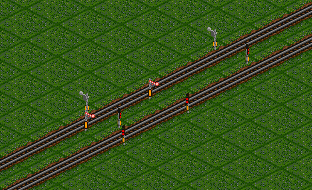
Programmable presignals can be built in the same ways as normal presignals. There are variants as semaphores and light signals as well as the possibility to build them as two-way and one-way signals.
Availability
Programmable presignals are only available in JGR's patch pack and depend on a couple of settings:
Realistic train braking has to be deactivated (the original braking has to be used)
Programmable presignals have to be explicitly activated

Passing
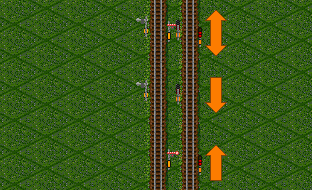
Passing a programmable presignal does not differ from normal presignals. They can only be passed when approaching from the correct side. When approaching from the back side of the signal, a train will stop and turn around.
Behavior
Programmable presignals are block signals, so they will always show "Stop!" when a train is in the corresponding signal block.
The conditions to make a programmable presignals show "Go!" for an empty signal block have to be programmed. Without any such program, the signal will always show "Stop!", no matter what other signals are placed around the signal block or whether the block is free or not.
The program consists of a set of commands, which may be nested within each other. By doing so, one combines conditions to be evaluated and actions to be done, which then define exactly under which circumstances the signal should show "Go!" or "Stop!".
Programming
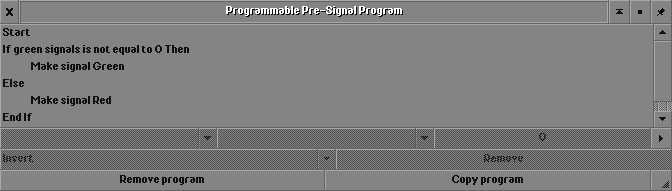
Programming is done in an extra GUI which is called from within the signal building menu. To open that GUI, one clicks the wrench symbol and then the signal to be programmed. This will then show the program currently defined for that program (if any) and contains buttons that allow modifying the program. To do that one simply uses the corresponding buttons, which in turn activate further buttons to set the relevant options. By doing so, one can set everything up in the way one wants to.
The program itself consists of multiple pieces:
Condition: A condition has the following form:
IF (criterion)
  THEN (command1)
ELSE (command2)
If the criterion is fulfilled, command1 will be evaluated, otherwise command2 will be evaluated. Both command1 and command2 again can be conditions or actions, which allows more complex rules.
Action: "Set signal to red" or "Set signal to green"
Criterion: Basically a check on some game value that returns true or false
Important: The evaluation of the program stops as soon as an action is encountered. That sets the value of the signal, any further commands are ignored.
Programming criteria
The following criteria can be used within a condition:
- always
This criterion is always fulfilled. The condition then becomes
Command1 will always be run, command2 cannot be reached.IF always THEN (command1) ELSE (command2) - never
This criterion is never fulfilled. The condition then becomes
IF never
  THEN (command1)
ELSE (command2)This means the number of exit or combo presignals in the signal block which show "Go!". Normal block signals are not counted. The condition then becomes
IF (green signals (comparison) (value))
  THEN (command1)
ELSE (command2)This means the number of exit or combo presignals in the signal block which show "Stop!". Normal block signals are not counted. The condition then becomes
IF (red signals (comparison) (value))
  THEN (command1)
ELSE (command2)One can check the state of other signals. These signals have to be one-way exit or combo presignals. The condition then becomes
IF (signal on tile xy) is green
  THEN (command1)
ELSE (command2)Slots conceptually belong to the restricted pathfinder for path signals and are explained over there. Programmable presignals can red the values of slots, but not change them.
IF slot occupancy of (slot name) (comparison) (value)
  THEN (command1)
ELSE (command2)Slots conceptually belong to the restricted pathfinder for path signals and are explained over there. Programmable presignals can red the values of slots, but not change them.
IF slot occupancy remaining of (slot name) (comparison) (value)
  THEN (command1)
ELSE (command2)Counters conceptually belong to the restricted pathfinder for path signals and are explained over there. Programmable presignals can red the values of counters, but not change them.
IF value of (counter name) (comparison) (value)
  THEN (command1)
ELSE (command2)Combining rules
The conditions within a program can be nested. That allows combining multiple conditions and may look something like this:
IF (condition1) THEN
  IF (condition2)
    THEN (command1)
  ELSE (command2)
ELSE
  IF (condition3)
    THEN (command3)
ELSE (command4)One could for example program a signal guarding a detour track so that it only shows "Go!" if the main track is full and there is still capacity on the detour track.
Examples
Block signal
The behavior of a standard block signal can be created with the following program:
Set signal to green
Block signals do not know conditions or checks on other signals. It just checks if the block is free, and this is done independently from any programming anyway.
Presignal
The normal presignal behavior can be created with the following program:
IF (green signals not equal to 0) THEN
  (set signal to green)
ELSE
  (set signal to red)
The number of signals evaluates the number of exit and combo presignals in that block. If their number is not equal to zero (meaning at least one such signal shows "Go!"), the programmed presignal will also show "Go!".
Priority of tracks
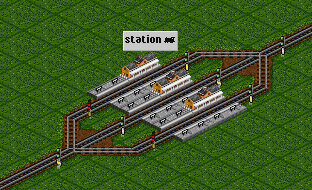
In this rather contrived example nested conditions are used to set priorities for the different platforms of a station. If the station is empty, only the platform in the middle is to be used. If that one is used, the platform to the left shall be used, and only if both platforms are in use, the one to the right is supposed to be used.
The signal block to the right of the station needs to be a presignal block, otherwise the programmable signals to the left cannot work correctly. That is also why there are combo presignals at the end of the outer platforms - the programming needs to check the presignal state at the other end of the platform, while those signals at the same time need to correctly handle the entrance to the signal block to the right of the station.
The programmable presignal on the left platform uses the following program (A is the coordinate of the signal at the middle platform):
IF signal on tile A is green THEN
  set signal to red
ELSE
  set signal to green
The programmable presignal on the platform to the right has a more complicated program, as it needs to check the state of the signals on the other two platforms (A is the coordinate of the signal at the middle platform, B is the coordinate of the signal on the leftmost platform):
1 IF signal on tile A is green THEN
2   set signal to red
3 ELSE
4   IF signal on tile B is green THEN
5     set signal to red
6   ELSE
7    set signal to green
Copying rules
Since there are probably quite a number of signals on the network, setting up rules for each signal becomes very tedious, especially if the rules are the same. Instead of having to program each and every signal from scratch, one can copy existing programs.
To copy an existing program, one simply uses the programming GUI for the signal onto which the copy is to be done. From there one has the possibility to copy an existing program. That is done by clicking the corresponding button and then choosing the signal from which to copy. That's it. Important note: This creates a copy of the program, so if you then see that the program is incorrect, you have to repair it for each and every signal or repair once and re-copy it to all other signals.
Usage
As mentioned in the introduction, the biggest problem of the programmable presignals is the fact that they are not path signals. That severely limits the usage. For path signals one has the possibility to directly influence the path finding and reservation. That works in similar ways, but can check way more conditions (for example the timetable of the train or several properties of the train itself), making it much more versatile.