


In JGR's patch pack it is possible to include custom signal types. That means you cannot just have new signal graphics as in OpenTTD, but signals with new custom behavior which differs from the built-in signal types.

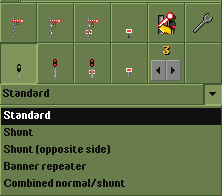
The signals can be selected via the signal building menu just as the normal signal types. If a fitting signal set has been loaded, there is an additional drop-down menu at the bottom, from which you can select the additional signals. The selection in that menu updates the previews in the signal menu and shows the signal types that have been selected from the drop-down. Depending on the type of signal (block signal, presignal, path signal), it will be shown in the corresponding position in the menu. Types which are not available are greyed out.
The building possibilities depend on whether the signal is a block or path signal and whether there are other restrictions concerning the placement of signals. With realistic braking enabled no presignals can be built, neither can two-way signals. These restrictions also apply to new custom signal types.
The directions in which the signal can be passed also depend on whether it is a block or path signals. If it is a block signal, it can only be passed from the direction the signal aspect is facing, path signals can be passed in both directions as usual.
Standard
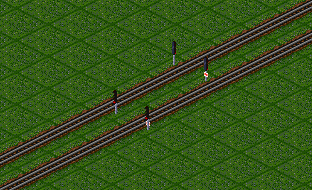
These are normal path signals, as usual in a normal variant (can be passed from the back side) and a one-way variant. They are a bit taller than the built-in path signals and contain some more lights.
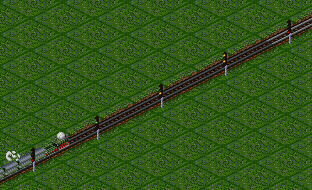
The most interesting thing about these signals are the looks, if realistic braking has been activated: Depending on the configuration of the signal set, these signals show more than just "Stop!" or "Go!" aspects. They can show up to two additional aspects, which basically mean something like "Go on with attention, there might be a stop ahead." This is marked by one or two additional yellow lights. However, that is really just a change in looks.
If one has also activated the option "realistic train braking is aspect limited", the trains now choose their top speed according to the signal aspect they can see. Effectively, it tells the virtual train crew, how many signals in front of him will allow him to continue and how much free track there is available for braking. This may lead to situations that trains will not use their full possible speed. The usual very dense signal placement might be counter-effective for fast trains that need long braking distances.
Shunt signal
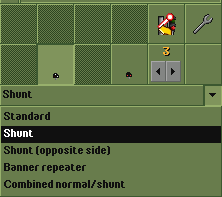
The shunting signal is a kind of a dwarf signal and is usually used for shunting yards (details depending on the country of course).
The signal is placed on track level (hence the term dwarf signal), it comes only as path signal and no-entry signal. The no-entry variant is just an optical adaptation compared to the normal no-entry signal, instead of showing a no-entry sign it just shows a red shunt signal.
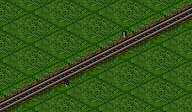
As can be seen (or maybe not...) the signal is rather small. If shows "Stop!" by using two red lights, "Go!" is signaled by white lights. Both aspects are only visible by really looking closely. This signal is therefore mainly useful for realistic signal placement, not so much for playing as it is really hard to distinguish the signal states.
The signal also has different properties compared to normal path signals: It shows the same two aspects "Stop!" and "Go!", but it also influences pathfinding and path reservation. The same properties can be achieved by programming a pathfinding restriction, but this signal has these properties built in.
One relevant difference compared to normal path signals can only be observed when activating realistic braking and "realistic train braking is aspect limited". The signal only allows reserving a path up to the next signal, which also restricts the possible braking distance of the train. Therefore the train will go rather slowly by this signal, so that it can safely come to a stop if needed. With normal path signals the path will be reserved across multiple signals if needed to get a free track for the higher braking distance at full speed. That restriction also means that this signal is only useful in stations, shunting yards, sidings and other such places, but not for main line tracks.
Shunt (opposite side)
This signal works as the previous one, but it is shown on the opposite side of the track. That makes it useful mainly for tracks where trains may change direction.
Banner repeater
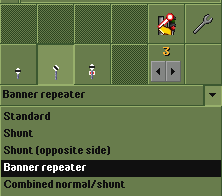
The banner repeater signal is a signal announcement, telling the train crew the aspect of the next signal. Trains never stop at this signal, but continue to the next one, the one with the aspect that is being announced here. The term "repeater" is somewhat irritating at least for me, as one needs to look from the signal towards the train to see that it repeats the current signal aspect.
In the signal set by JGR these signals are shown as a white round shield with a black bar which is either horizontal or diagonal, depending on the aspect of the following signal. This corresponds to the "banner repeater" signal used in the UK.
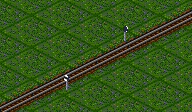
The behavior of the signal is modeled in the signal set. It uses the path reservation mode "reserve through", which means that if a train reserves a path up to this signal, it will continue to reserve the track beyond this banner repeater and up the next signal. The same effect can be achieved by programming a pathfinding restriction, this signal has the restriction already built in. A train therefore will never stop at the banner repeater as there will always be a reserved path to the next signal.
Usage of the signal is based on the name: It is placed to announce the next signal to an oncoming train. Therefore it is placed somewhere along the track, but not in front of junctions or station entries or similar. In the UK the signal (as far as I could understand from Wikipedia) is placed only if the relevant signal cannot be seen easily, as it may be after a curve. In other countries, other rules may apply, so it is left to the player to decide if and how to use this signal.
Combined standard/shunt
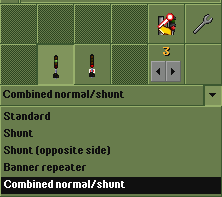
This signal is a combination of a normal path signal and a shunt-signal on the same signal post. The behavior does not differ from a normal path signal. When using the appropriate game settings (see above) these signals can also show additional aspects beyond "Stop!" and "Go!". Whether the aspect is shown on the path signal at the top or the shunt signal at the bottom depends on the situation:
If the path beyond the signal leads into a depot or a dead end, the shunt signal at the bottom is used. The same thing applies if the next signal is a shunt signal, or if the path goes to a dead-end and there is a shunt-signal in the opposite direction. In all other cases, the path signal is used. One can also program a signal restriction to enforce usage of the shunt signal.
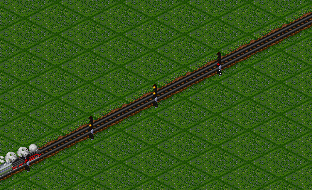
The first signals here show the aspect with the path signal at the top. The last signal shows the aspect as shunt signal as the track continues into a depot (beyond the screenshot).
This signal can be used in all places where there are diverging paths which depending on the direction lead to a siding or shunting yard or to a depot. Depending on the chosen path the aspect is then signaled in the correct way. On a plain track this signal does not make sense as the shunt signal part is never used.